Sound Mill X3 : User's Guide
 Contents
 Language
 Product Home
Sound Effects - Sample Scripts
 Page Bottom
Locator: Automator > Edit Script > Edit Script > Edit Steps .
Here are some sample Scripts to illustrate how Scripts work. Once you learn scripting, the possiblities are virtually endless. You will find there are often several ways to achieve the same affect, some are more modular and reusable that others.
Sample Scenario -
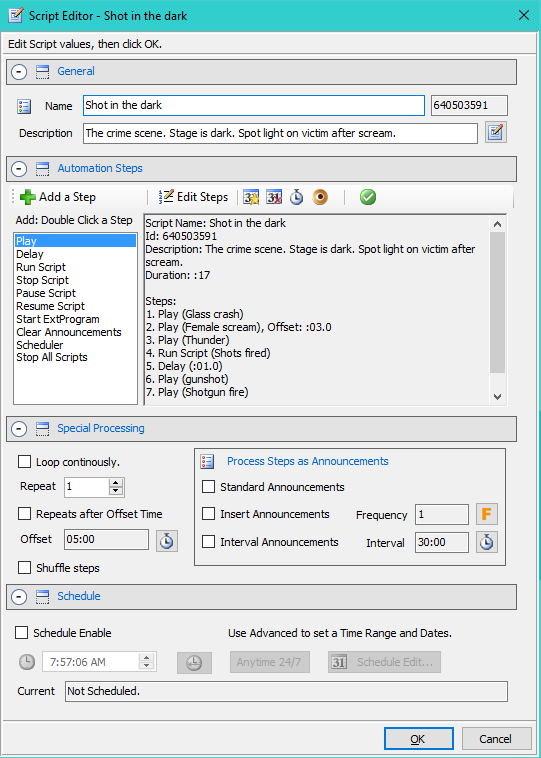
In these samples, we show multiple ways to Script a "Shot in the dark" scenario. In this scenario, the scene open to a dark stage. A window breaks. A chair is knocked over. The victim exclaims "Who is there?". Silence for 10 seconds to build suspense. Then gun shots ring out. Someone screams and the shooter runs out of the room.
Sample 1. Simple Sequence with Delay
Explanation: No Steps are timed in this Script. Steps 1, 2 and 3 play in sequence. Steps 4 is a 10 second delay. Then Steps 5, 6 and 7 play in sequence. Script ends.
Listing 1. Simple Sequence with DelayScript Name: Simple Sequence with Delay Steps: 1. Play (Glass crash) 2. Play (Chair knocked over) 3. Play (Who's there?) 4. Delay (:10.0) 5. Play (Two gunshots) 6. Play (Female scream) 7. Play (Foot steps running)
 To Page Top
Sample 2. Timed Offset Steps
Explanation: Steps 1,2 and 3 play in sequence. The last 3 Steps are Offset Timed. Step 4 (Gun shots) is timed to play 10 seconds after the Script starts. Step 5 (Scream) plays at the 11 second mark . Step 6 (Foot steps running) plays at the 14 second mark. Script ends when all sounds have stop playing.
Listing 2. Timed Offset StepsScript Name: Timed Offset Steps Steps: 1. Play (Glass crash) 2. Play (Chair knocked over) 3. Play (Who's there?) 4. Play (Two gunshots), Offset: :10.0 5. Play (Female scream), Offset: :11.0 6. Play (Foot steps running), Offset: :14.0
Sample 3. One Script Runs Another
Explanation: In this example, we Run Script 3 'A shot in the dark (using Run Script Steps)'.
Steps 1, 2 and 3 play in sequence.
Then Step 4 runs the second Script 'Shots and scream'. This Script plays the Gun shots Sound Item. And at the one second mark, it plays the Scream. When the Script ends, Step 5 runs Script 'Shots and scream' one more time.
Then Step 6 plays the Foot Steps - running and the Script ends.
Note that in this case, we could have just marked Script 'Shots and scream' to Repeat twice, rather than running it twice with Run Script Steps.
Listing 3. Using Run Script StepsScript Name: Using Run Script Steps Steps: 1. Play (Glass crash) 2. Play (Chair knocked over) 3. Play (Who's there?) 4. Run Script (Shots and scream) 5. Run Script (Shots and scream) 6. Play (Foot steps running) ----------------------------------- Script Name: Shots and scream Steps: 1. Play (Two gunshots) 2. Play (Female scream), Offset: :01.0
Sample 4. Script with Periodic Repeat
Explanation: Note that this Script is has been set to Loop continously. There will be a 5 minute delay between each run of the Script. This is a useful technique for haunted mansion type setups where you want to continuously Run Scripts periodically over time.
Listing 4. Periodic RepeatScript Name: Periodic Repeat Loop continously. Steps: 1. Run Script (Shot in the dark) 2. Delay (05:00)
Sample 5. The Haunted Mansion
Explanation
The Haunted Mansion is a typical case of timing sequences of sounds that should play concurrently and repeat over a period of time. In this scenario, we want the constant sound of wind with a thunder clap every 45 seconds. Then every 1 minute 30 seconds, we want the sound of floor boards creaking, a door slam, foot steps running then a scream. There are multiple ways to achieve this. We will use a method that employs 3 Scripts.
Haunted Mansion Master
The "Haunted Mansion Master" Script simply starts the two worker Scripts running. You could manually start the worker Scripts by selecting each Script and clicking the Run button. But by starting with this master Script, exact timing between the Scripts can be maintained.
Wind and Thunder
The "Wind and Thunder" Script has two Play Steps. Step 1 Plays the Thunder sound every 45 seconds. Auto Reset is enabled for this Step which causes the Step to continously play every time the Offset expires. Step 2 Plays the Wind sound. The Wind sound was set to Loop in the Sound Item Play Modifiers which causes it to continously replay. Since both Steps are Offset timed Steps, the program puts the Steps on the Timer stack and does not wait for either Step to finish processing. This is important since the program would otherwise wait until these Steps finish playing. And in the case of a Looping sound, it essentially never finishes until the Script is stopped.
The Scream
The "Scream" Script has four sequential Play Steps for the scream sequence. The Repeat is set to a high enough number (9999) to make the Script repeat for more than 24 hours. It will effectively run until the Stop button is clicked. The Repeats after Offset time is set to 1 minute 30 seconds ( 1:30). So this Script will be restarted every time 1 minute 30 seconds expires. Note that you could create several of this type of Script, each with its own sounds, and time the Scripts to fire at different offsets.
Listing 5. Haunted Mansion MasterScript Name: Haunted Mansion Master Steps: 1. Run Script (The Scream) 2. Run Script (Wind and Thunder) ----------------------------------- Script Name: Wind and Thunder Steps: 1. Play (Wind) 2. Play (Thunder), Offset: :45.0, Auto Reset ----------------------------------- Name: The Scream Loop continously. Repeats after Offset: 01:30 Steps: 1. Play (Floor boards creaking) 2. Play (Door slam) 3. Play (Foot steps running) 4. Play (Female scream)